


Boosting GPU Performance by Reordering Unstructured Mesh Cells


We're building a GPU flood solver for unstructured 2D meshes. On every step, each cell reads its neighbors' state and turns those values into fluxes across its edges. Before optimizing the solver, we wanted to answer one question: how much does the order of cells in memory affect the speed of those neighbor reads?
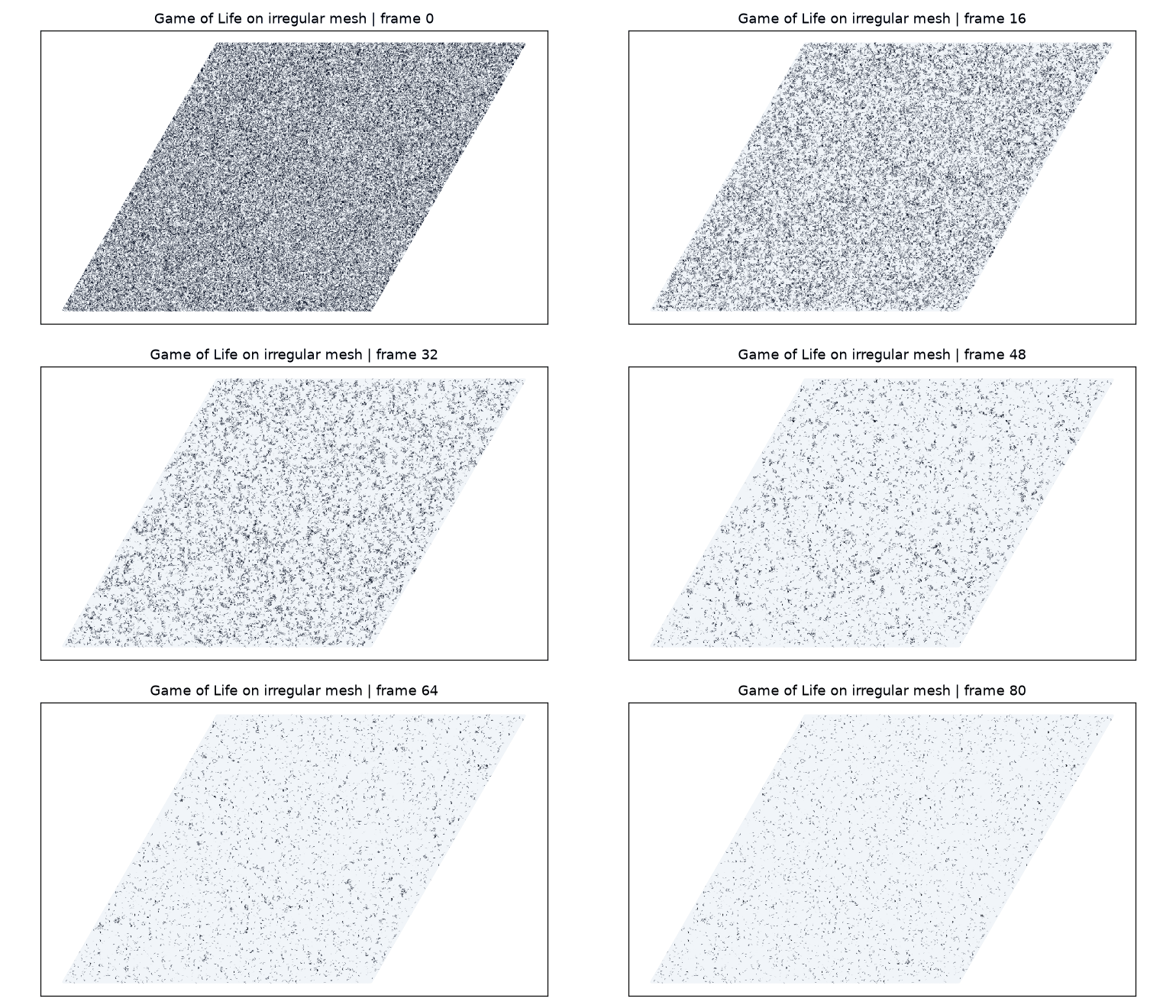
To find out, we swapped the solver for Game of Life on the same kind of mesh. The memory access pattern is the same (read your neighbors, write yourself), but there's almost no math, so the result mostly measures memory performance.
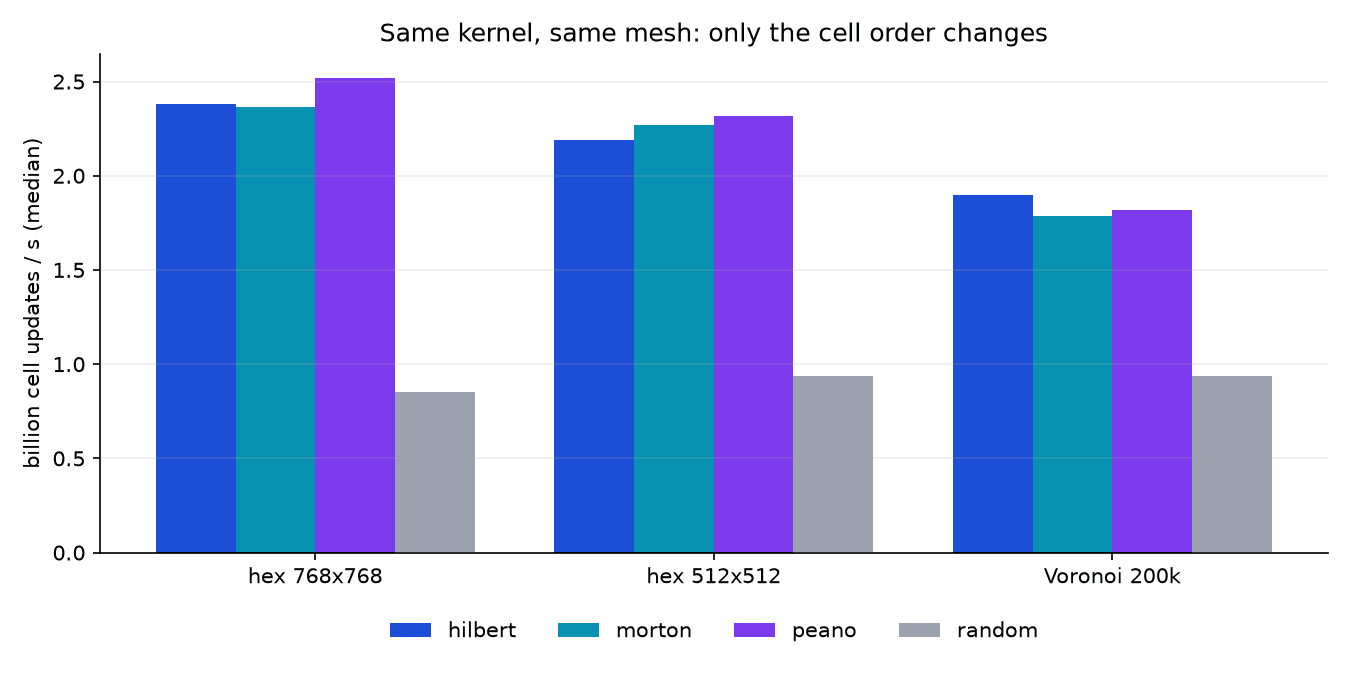
Storing cells along a space-filling curve instead of in random order made the benchmark 1.9-3x faster. We didn't change the kernel or the mesh. The simulation computes the same result, only the cell numbering changed.
Cell reordering assigns nearby mesh cells nearby positions in memory so GPU neighbor reads can reuse cache lines more effectively.
Why Cell Ordering Affects GPU Performance
A GPU memory system fetches data in cache-line-sized transactions. If a cell's neighbors live next to it in memory, one fetch can cover many of them. If they're scattered, neighbor reads can require separate trips to device memory.
Meshes don't always come with a useful order. Our Voronoi mesh numbers its cells in the order the random sites were generated, so random order is our baseline: it's what you get if you do nothing. The hex grids naturally come out row by row, which already has decent locality, so we shuffled them to create the same baseline.
A space-filling curve—Hilbert, Morton, or Peano—snakes through the 2D domain. Cells that are near each other in space then tend to be near each other in memory.
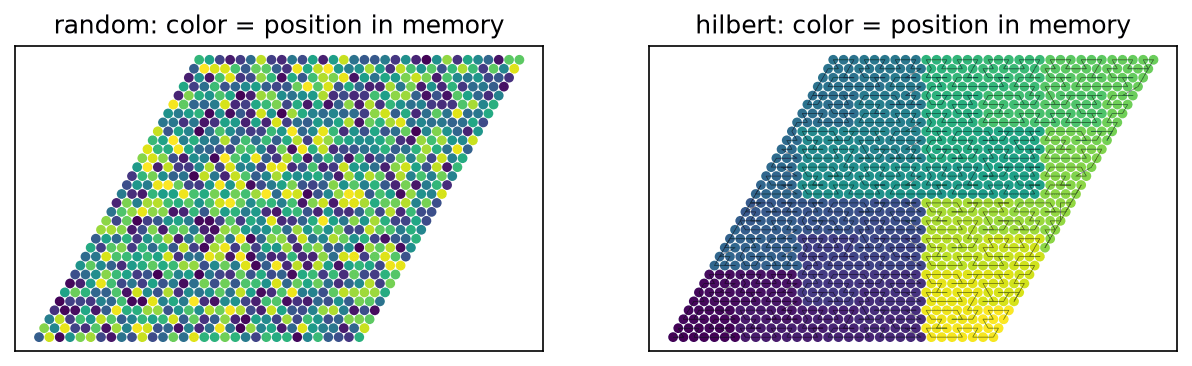
Each dot is colored by the cell's position in memory. With random order (left), you get noise. With Hilbert order (right), memory sweeps through the domain in compact blocks.
Benchmark Setup
- Hardware: an M1 Pro running Taichi 1.7.4, a Python framework that compiles kernels to the GPU, on the Vulkan backend. On a Mac, MoltenVK translates Vulkan to Metal. Every timed run reported
backend: vulkan, so nothing quietly fell back to the CPU. - Meshes: stored as CSR adjacency graphs. A 768x768 hex grid (589,824 cells, 3.53M directed edges), a 512x512 hex grid (262,144 cells), and a Voronoi mesh built from 200,000 random sites with scipy.
- Orderings: each one is a permutation applied to the cells before the run. Random uses
rng.permutation. For the curves, we snap cell centers to a grid, compute each cell's position along the curve, and sort withargsort. Neighbor indices get remapped to match. Geometry, initial state, and rules stay the same. - Kernel: two
i32buffers, one for the current state and one for the next. One kernel counts live neighbors along each CSR row and looks up birth/survive tables, then a second one copies the new state back. Standard B3/S23 rules. - Timing: an untimed warmup for each ordering,
ti.sync()on both sides of the timed region, and no reads back to the host inside that region. Each number is the median of 5 runs.
GPU Performance Results
Hex 768x768, 1000 steps, 100 warmup steps:
| ordering | steps/s | range over 5 runs | µs/step | G cell-updates/s | vs random |
|---|---|---|---|---|---|
| peano | 4273 | 4252-4274 | 234 | 2.52 | 2.96x |
| hilbert | 4033 | 4000-4058 | 248 | 2.38 | 2.80x |
| morton | 4009 | 3950-4102 | 249 | 2.36 | 2.78x |
| random | 1441 | 1437-1444 | 694 | 0.85 | 1.00x |
Smaller meshes, 500 steps, 50 warmup steps:
| mesh | best curve | worst curve | random | curve vs random |
|---|---|---|---|---|
| hex 512x512 | peano 8840 | hilbert 8358 | 3566 | 2.34-2.48x |
| Voronoi 200k | hilbert 9491 | morton 8934 | 4693 | 1.90-2.02x |
The choice of curve has little effect
Peano came out on top for both hex meshes in this run, while Hilbert won on Voronoi. In a repeat run, Morton took first place on the 512-cell hex mesh. The curves stayed within 9% of one another, and each beat random order by about 1.9-3x. All three were effective. Our solver uses Hilbert, but Morton is the simplest to implement, so the example below uses it.
Random ordering limits throughput
Under random order, every mesh runs at about 0.9 billion cell updates per second, whatever its size or shape. Random ordering causes poor cache reuse, so mesh layout has little effect. With a curve, the same meshes reach 1.8-2.5 billion updates per second because neighbors are stored closer together.
Memory is the bottleneck
If you count only the bytes each step has to move (edge list, row offsets, state reads, and writes), the curve orders move about 105-111 GB/s on the big hex mesh. That's more than half of the M1 Pro's 200 GB/s spec. Random order manages 37 GB/s of useful traffic and spends the rest of its time waiting on cache misses.
How to Reorder Cells in Your Own Mesh
You need two NumPy functions. morton_order takes cell centers and returns a permutation, and reorder_csr renumbers a CSR adjacency graph to match it. Here, order maps each new cell position to its old cell ID; new_id is the inverse mapping used to rewrite neighbor indices. Apply the same permutation to every other per-cell array you have (state, geometry, boundary flags).
import numpy as np

def morton_order(xy, bits=10):
    """Permutation that sorts cells along a Z-order (Morton) curve."""
    lo, hi = xy.min(0), xy.max(0)
    g = ((xy - lo) / np.where(hi > lo, hi - lo, 1) * (2**bits - 1)).astype(np.uint64)
    key = np.zeros(len(xy), np.uint64)
    for b in range(bits):
        key |= ((g[:, 0] >> b) & 1) << (2 * b)
        key |= ((g[:, 1] >> b) & 1) << (2 * b + 1)
    return np.argsort(key, kind="stable")

def reorder_csr(indptr, indices, order):
    """Renumber cells so that new cell k is old cell order[k]."""
    new_id = np.empty_like(order)
    new_id[order] = np.arange(len(order))
    deg = np.diff(indptr)[order]
    new_indptr = np.concatenate([[0], np.cumsum(deg)])
    src = np.repeat(indptr[order] - new_indptr[:-1], deg) + np.arange(new_indptr[-1])
    return new_indptr, new_id[indices[src]]

order = morton_order(positions)
indptr, indices = reorder_csr(indptr, indices, order)  # int64; cast with .astype(np.int32) for i32 GPU buffers
state = state[order]
With bits=10, the domain is split into a 1024x1024 grid. Cells that land in the same grid square keep their original relative order, so if your mesh is much finer than that, increase bits.
What it costs
Reordering is a one-time cost. On the 768 hex mesh, the code above runs in about 110 ms: 74 ms to compute the keys and sort, 33 ms to rebuild the CSR graph. Each step saves about 450 µs, so it pays for itself after roughly 240 steps. You only do it when you load the mesh.
Reading state back to the CPU is slow. If we copy the full state to the host after every step, the 768 hex mesh with Hilbert order drops from 4033 to 565 steps/s (median of 5 runs of 1000 steps, ranging from 510 to 826). Each readback costs about 1.5 ms, six times the step time. A flood run still needs periodic output, so how often you read back matters about as much as how you order the cells.
Caveats
All of these numbers come from a single M1 Pro going through MoltenVK. A discrete GPU with a different cache setup will give different ratios. Game of Life also does almost no math per neighbor, while a real flux kernel does plenty, so the gap should shrink. Treat 2-3x as the most you can expect from reordering on this hardware. Your own kernel will probably gain less.
Conclusion
If your GPU code gathers neighbor data on an unstructured mesh, check the order of your cells. If the mesher or loader hands them over in arbitrary order, you're probably leaving speed on the table. Sorting them along a Morton curve takes about 20 lines of NumPy and a tenth of a second when the mesh loads, and on this benchmark it made every step 2-3x faster.
For us, the real test is the flood solver itself. It already orders its cells along a Hilbert curve, and next we'll time its flux kernel the same way to see how much of that speedup survives once the kernel does real math.
Talk to us about GPU performance
If you are struggling with bottlenecks in your unstructured mesh solver, contact our team to explore architectural optimizations.


Frequently Asked Questions
Why does cell ordering affect GPU simulation speed?
GPUs fetch data in cache lines. If neighboring cells are stored close together in memory, one cache fetch retrieves multiple neighbors, reducing the number of slow trips to device memory.
Which space-filling curve should I choose?
In our benchmarks, Hilbert, Morton, and Peano curves all performed similarly, typically offering a 1.9-3x speedup over random ordering. You can choose based on ease of implementation, as Morton is generally the simplest.
Is the reordering process expensive?
No, reordering is a one-time setup cost performed when the mesh loads. In our tests, it took about 110ms and paid for itself after roughly 240 simulation steps.
How much speedup can I realistically expect?
On our hardware, we saw a 2-3x improvement. However, your specific gains will depend on your hardware cache setup and how much computation your kernel performs per neighbor read.
Does my mesh need a specific structure to be reordered?
No, this technique applies to unstructured meshes. You simply need the cell centers to compute the curve and an adjacency graph to reorder the neighbor indices.


