


Dynamic Email Domain Validation in Keycloak with a Custom Authenticator


Keycloak ships with a built-in mechanism for restricting user registration by email domain — but it's static. Changing the allow-list means touching realm configuration and redeploying. For B2B SaaS products that onboard new tenants regularly, that's an operational bottleneck you don't want.
The right solution is to move domain policy out of Keycloak entirely and delegate it to a backend service that can be updated at runtime. This article walks through building a custom Keycloak Authenticator — called domain-email-validator — that does exactly that: at login time, it calls an external API to decide whether the user's email domain is permitted.
By the end, you'll understand the full architecture, the Java implementation, how to wire it into both browser and IDP flows, and the operational tradeoffs involved.
Why Static Domain Restrictions Fall Short in B2B Products
Keycloak's native domain restriction works well for single-tenant deployments with a fixed list of approved domains. But in multi-tenant environments, you typically need:
- Per-tenant domain rules — Tenant A allows
acme.com; Tenant B allowsglobex.comandinitech.com. - Runtime updates — A new customer signs a contract and needs access today, not after the next deploy.
- Consistency across login methods — The same rule should apply whether a user logs in via username/password or via Google SSO.
A custom Authenticator SPI solves all three. It's evaluated on every login attempt, it reads policy from an external source, and it plugs into both browser and post-broker flows with the same implementation.
Architecture Overview
The approach is a thin decision layer inside Keycloak. The plugin does not own domain policy — it only enforces it.
The contract is intentionally minimal:
- Keycloak sends
{ domain, realmId }to a backend endpoint. - Backend returns
200to allow or any non-200to deny. - Keycloak continues or blocks the flow accordingly.
This keeps all business logic — tenant configuration, domain lists, auditing — in your backend, where it belongs.
Request Lifecycle
- Keycloak executes earlier steps (credential check or broker handshake).
- The domain validator step runs.
- It reads the user's email from the active context.
- It sends a small HTTP POST to the policy service.
- The backend returns allow or deny.
- Keycloak continues the flow or shows a denial message.
Because the decision is made per login attempt, domain policy changes take effect immediately — no cache warmup, no redeployment.
Implementation
The authenticator is split into two standard Keycloak SPI parts: a factory that registers the provider and exposes configuration fields, and an executor that runs the validation logic at login time.
Factory: Registering the Provider
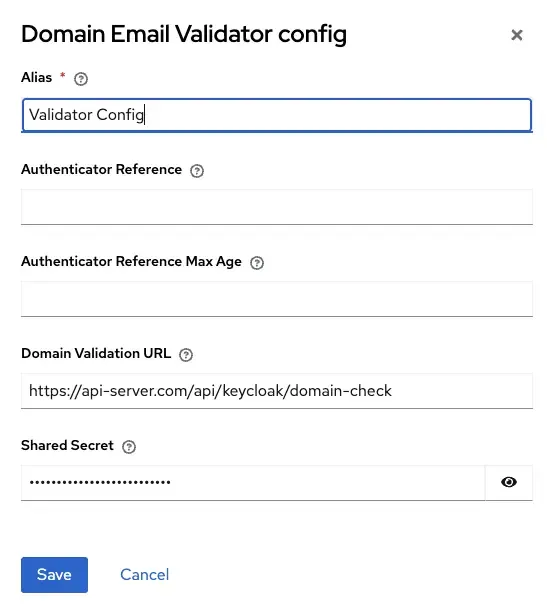
DomainValidatorAuthenticatorFactory defines two configuration properties visible in the Keycloak Admin UI under the flow step's Config tab:
.property()
    .name(DomainValidatorAuthenticator.CONFIG_VALIDATION_URL)
    .label("Domain Validation URL")
    .type(ProviderConfigProperty.STRING_TYPE)
    .defaultValue("https://my-server/api/keycloak/domain-check")
    .add()
.property()
    .name(DomainValidatorAuthenticator.CONFIG_SHARED_SECRET)
    .label("Shared Secret")
    .type(ProviderConfigProperty.PASSWORD)
    .secret(true)
    .add()
There is no hidden YAML or server-side config file. Everything is per-flow-execution and editable through the UI, which makes it easy to configure different endpoints per realm.
Executor: The Core Validation Logic
The central method is authenticate(AuthenticationFlowContext context). It first resolves the email from context — either from a submitted form or from a brokered identity:
String email = resolveBrokeredEmail(context);
String flowType;

if (email != null) {
    // Post-broker flow: email came from the IDP identity token
    flowType = "idp";
} else {
    // Standard browser flow: read from the submitted form
    MultivaluedMap<String, String> formData =
            context.getHttpRequest().getDecodedFormParameters();
    email = formData.getFirst("username");
    flowType = "form";
}

// If no email or no @ sign, pass through — Keycloak handles invalid credentials
if (email == null || !email.contains("@")) {
    context.success();
    return;
}
Then it reads the flow config and calls the policy service:
Map<String, String> config = context.getAuthenticatorConfig().getConfig();
String validationUrl = config.get(CONFIG_VALIDATION_URL);
String sharedSecret = config.get(CONFIG_SHARED_SECRET);

HttpPost post = new HttpPost(validationUrl);
post.setEntity(new StringEntity(
    String.format("{\"domain\":\"%s\",\"realmId\":\"%s\"}",
        escapeJson(domain), escapeJson(realmId)),
    ContentType.APPLICATION_JSON
));

if (sharedSecret != null && !sharedSecret.isBlank()) {
    post.setHeader("Authorization", "Bearer " + sharedSecret);
}
Finally, it interprets the response:
int statusCode;
try (CloseableHttpResponse response = httpClient.execute(post)) {
    statusCode = response.getStatusLine().getStatusCode();
} catch (IOException e) {
    LOG.errorf(e, "DomainValidatorAuthenticator: HTTP call failed for domain '%s'" +
                    " in realm '%s'", domain, realmId);
    failWithError(context, "domainValidationUnavailable");
    return;
}

if (statusCode == 200) {
    context.success();
} else {
    LOG.infof("DomainValidatorAuthenticator: domain '%s' denied in realm '%s'" +
                " (HTTP %d)", domain, realmId, statusCode);
    failWithError(context, "domainNotAllowed");
}
Any IOException — network failure, timeout, connection refused — results in domainValidationUnavailable. Missing config results in domainValidatorMisconfigured. The validator is fail-closed: when in doubt, it denies.
Resolving the Brokered Email
For post-broker flows (e.g. after Google SSO), the email comes from the already-resolved user object, not the form:
private String resolveBrokeredEmail(AuthenticationFlowContext context) {
    UserModel user = context.getUser();
    if (user != null) {
        String userEmail = user.getEmail();
        if (userEmail != null && !userEmail.isBlank()) {
            return userEmail.trim();
        }
    }
    return null;
}
This means the same authenticator class handles both input sources. The only difference is where the email comes from — the rest of the flow is identical.
Docker Build
The Dockerfile wires the Maven build and the Keycloak image together cleanly:
FROM quay.io/keycloak/keycloak:26.6.0 AS base-keycloak FROM maven:3.9-eclipse-temurin-21 AS maven-builder WORKDIR /build COPY keycloak-domain-validator/pom.xml ./pom.xml RUN mvn dependency:resolve -q COPY keycloak-domain-validator/src ./src RUN mvn package -q -DskipTests FROM base-keycloak AS keycloak-builder COPY /build/target/domain-validator.jar /opt/keycloak/providers/ RUN /opt/keycloak/bin/kc.sh build FROM base-keycloak COPY /opt/keycloak/ /opt/keycloak/ ENTRYPOINT ["/opt/keycloak/bin/kc.sh"]
The multi-stage build keeps the final image lean: Maven is only present during the build stage, and the compiled JAR is dropped directly into Keycloak's providers directory.
Configuring Authentication Flows
1. Browser Login Flow (Username/Password)
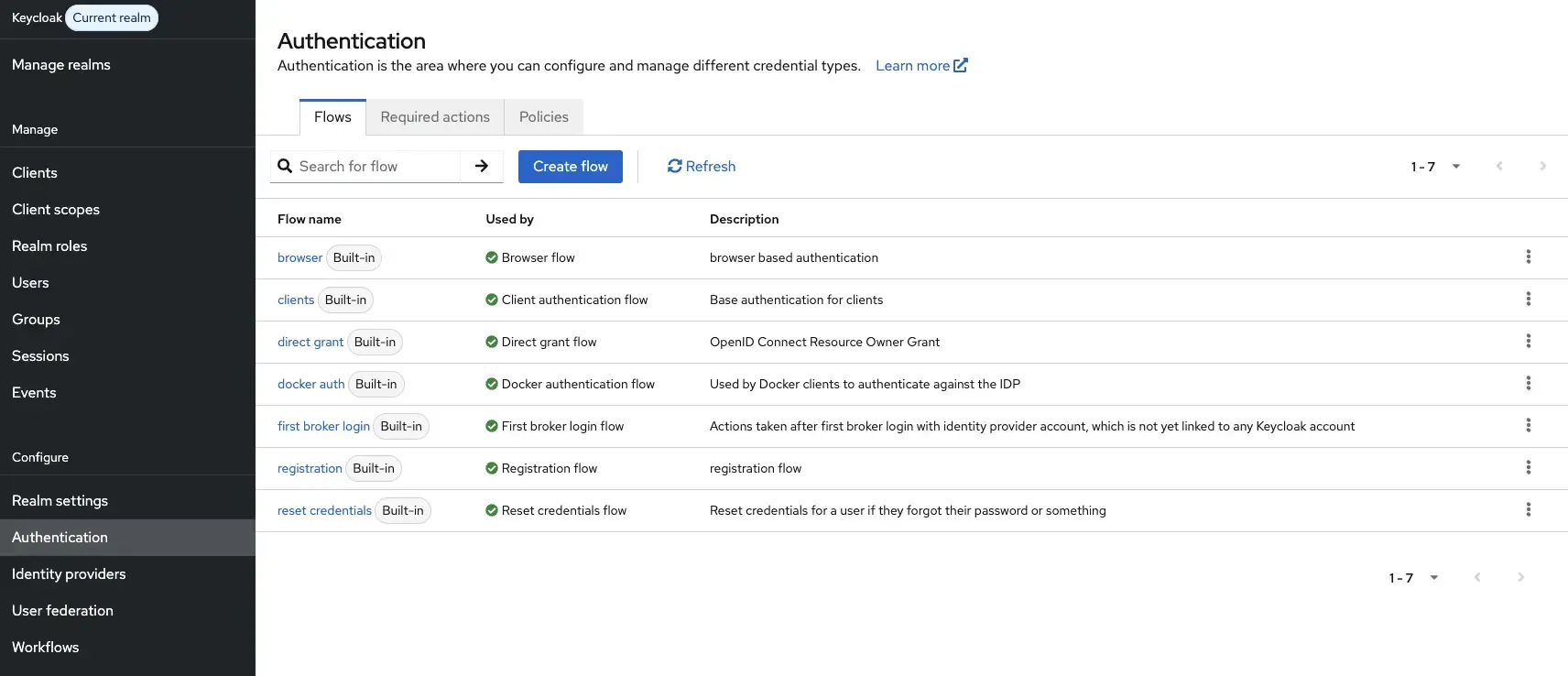
1. Go to Authentication → Flows.
 )
)
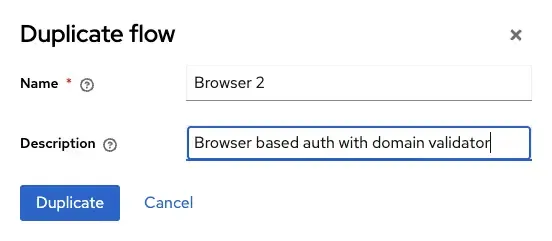
2. Duplicate the built-in browser flow
3. Inside the Forms sub-flow, add the Domain Email Validator step.
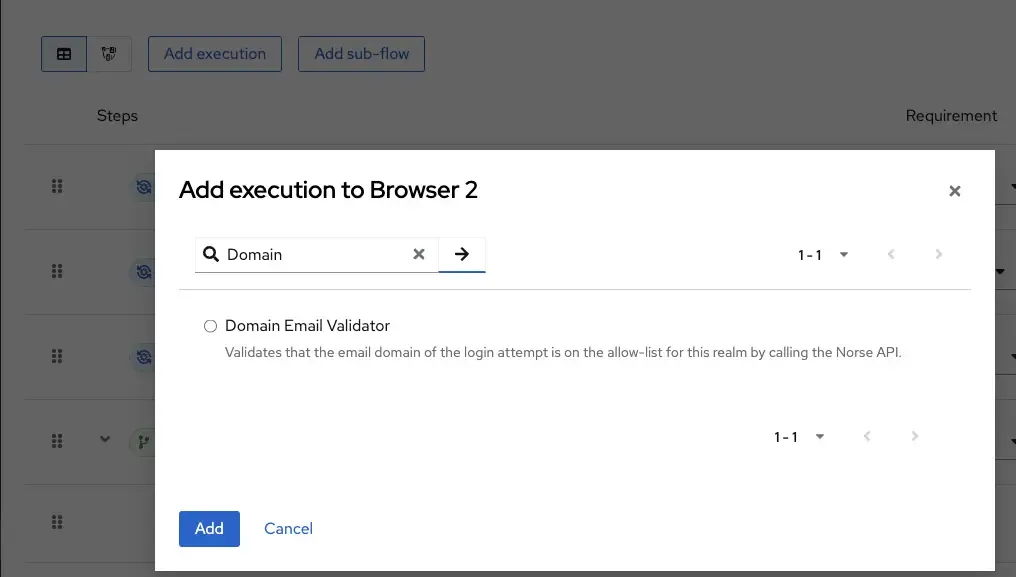
4. Place it directly after Username Password Form , and set its requirement to Required.

5. Click Config on the step and enter your validation URL and shared secret.
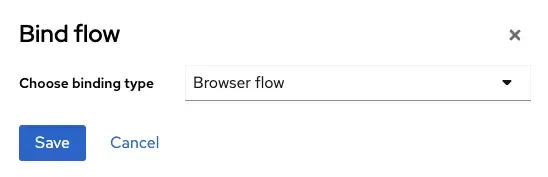
6. Bind the duplicated flow as the active browser flow under Bindings.
The validator reads the email from the submitted username field in the login form.
2. Google / IDP Login Flow (Post-Broker)
- Create a new dedicated flow for post-broker login.
- Add Domain Email Validator as a
Requiredstep. - Go to Identity Providers → Google → Post Login Flow and assign the new flow.
The validator reads the email from the resolved user identity returned by the IDP.
Best Practices
Keep the validation endpoint fast and internal. Since this check is synchronous and blocks login, endpoint latency directly affects user experience. Route it over internal networking and keep the response payload small.
Monitor the endpoint as authentication-critical infrastructure. Set up latency alerts and error rate tracking. A degraded policy service means users can't log in — treat it accordingly.
Rotate the shared secret regularly. The bearer token is your only authorization layer between Keycloak and the policy service. Automate rotation through your secrets management tooling.
Always set the step as Required. An Alternative or Disabled requirement silently bypasses the check, which defeats the purpose entirely.
Ensure Google OAuth includes the email scope. Without it, the IDP flow won't have an email to validate, and the validator will pass through silently.
Keep the API contract minimal and stable. The { domain, realmId } payload and the HTTP status response are a clean, versioned interface. Resist the temptation to add fields over time unless there's a clear reason.
Security Posture
The validator is intentionally conservative by design:
- It derives the domain from the server-side authentication context, not from client-supplied input.
- It supports a bearer secret for service-to-service authorization.
- It denies access when validation cannot be completed for any reason — misconfiguration, network failure, or unexpected response codes all result in denial.
In other words: authentication proceeds only when policy can be positively verified.
Tradeoffs and Alternatives
| Approach | Flexibility | Operational cost | Complexity |
|---|---|---|---|
| Keycloak built-in domain restriction | Low (static) | Low | Low |
| Custom Authenticator + external API | High (dynamic) | Medium | Medium |
| Keycloak scripting (deprecated) | Medium | Medium | Medium |
| Custom User Storage SPI | High | High | High |
The custom Authenticator approach hits the right balance for most B2B products: it's dynamic, tenant-aware, independently deployable, and doesn't require deep Keycloak internals knowledge to maintain.
The main tradeoff is availability coupling — if your policy service goes down, so does login. Mitigate this with high-availability deployment, circuit breakers at the infrastructure layer, and solid monitoring.
Conclusion
For multi-tenant B2B products, static email domain restrictions in Keycloak simply don't scale. A custom Authenticator SPI that delegates to an external policy service is a clean, maintainable pattern that keeps domain management out of Keycloak configuration and in the hands of your backend team.
Key takeaways:
- The plugin is a thin decision layer — it enforces policy but doesn't own it.
- The same authenticator class handles both browser and IDP (post-broker) login paths.
- The API contract is minimal:
{ domain, realmId }in, HTTP status out. - The validator is fail-closed — network errors and misconfigurations result in denial, not bypass.
- Configuration lives in the Keycloak Admin UI, scoped per flow execution, making it easy to manage per realm.
- Treat the policy endpoint as authentication-critical infrastructure: monitor latency, alert on errors, and keep it highly available.
FAQ
Frequently Asked Questions
What happens if the policy service is unreachable during a login attempt?
The authenticator catches the IOException and fails with domainValidationUnavailable. Login is denied. This is the intentional fail-closed behavior — an unreachable policy service is treated as a denial rather than a bypass.
Can this authenticator be used across multiple realms with different endpoints?
Yes. The validation URL and shared secret are configured per flow execution, not globally. Each realm can have its own duplicated flow pointing to a different endpoint, or the same endpoint can handle per-realm routing using the realmId field in the request body.
Does this affect performance at login time?
It adds one synchronous HTTP call per login attempt. In practice, if the policy service is on the same internal network and kept lightweight, the added latency is negligible — typically single-digit milliseconds. Treat the endpoint as latency-sensitive infrastructure.
What error message does the user see when denied?
The authenticator calls failWithError(context, "domainNotAllowed"), which maps to a message key in Keycloak's theme messages file. You can customize the displayed text by overriding that key in your realm's login theme.
Why use an external API for domain validation in Keycloak?
It allows domain rules to be updated instantly without changing Keycloak configuration or redeploying realms.
Does the validator work with Google SSO and other identity providers?
Yes. The same authenticator can validate domains for browser logins and post-broker identity provider flows.
What happens if the validation service is unavailable?
Login is denied because the authenticator uses a fail-closed security approach.
Can different Keycloak realms use different validation endpoints?
Yes. The validation URL and shared secret are configured per authentication flow execution.
Does the validator add noticeable login latency?
Usually no. A lightweight internal API typically adds only a few milliseconds to authentication time.


