


Faster Geospatial Animations with PMTiles: Multi-Layer MVT Time Series in OpenLayers


Most people try to animate time series by stacking separate tile sources or flipping CSS styles mid-frame. That causes flicker and a surprising amount of wasted CPU/GPU work. The core takeaway is simple: bake your timesteps into a single vector-tile archive (PMTiles) with per-timestep named layers, load it once, and drive animation by re-styling already-decoded tiles.
I tested this with OpenLayers and noticed the difference right away: playback became smoother and far less CPU-bound once tiles were pre-baked and cached. The hard part is server-side — how you generate, package, and serve tiles matters more than which client library you pick.
When you animate a map by switching between separate tile sources, each frame causes one of two expensive operations: a network fetch of new tiles, or client-side re-decoding and re-styling. Baking timesteps into one archive avoids that by turning each frame into a cheap style re-evaluation on already-decoded features.
The architecture: single archive, dynamic layers
MVT (Mapbox Vector Tile) is a compact protobuf-based vector tile format that encodes geometry and attributes per z/x/y tile. PMTiles packages MVT tiles into a single file for efficient distribution and partial HTTP range retrieval.
The key workflow:
- Server side — each timestep is a separate GeoJSON file.
tippecanoejoins them into one PMTiles archive, giving each timestep its own named MVT layer (timestep_00,timestep_01, …). - Client side — one
VectorTileSourceloads the archive once. OneVectorTileLayeruses a style function that reads a mutablecurrentLayerNamevariable. Advancing a frame means: update the variable, calllayer.changed(). OpenLayers re-runs the style function on the already-decoded tile features and repaints — no network request, no re-decode.
Complete working example
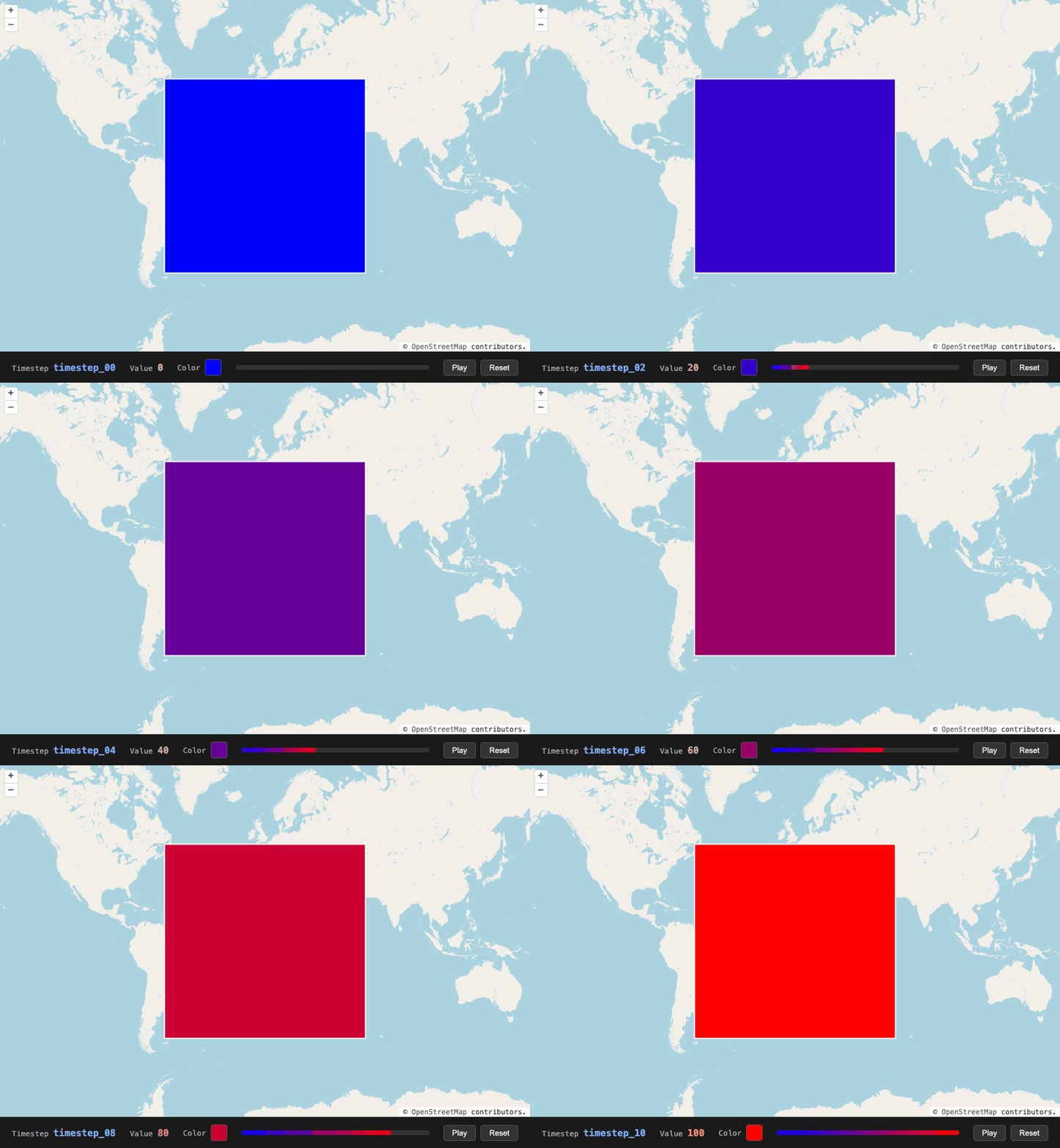
This section contains everything needed to reproduce the demo from scratch: 11 per-timestep GeoJSON files, a tile generation script, and the client HTML.
Step 1 — Per-timestep GeoJSON files
Create 11 files, one per timestep. Each contains a single large polygon with a value property. The temporal identity comes from the file name (and the MVT layer name tippecanoe will assign), not from a property on the feature.
for i in $(seq 0 10); do
  pad=$(printf "%02d" $i)
  value=$((i * 10))
  cat > "square_t${pad}.geojson" << EOF
{
  "type": "FeatureCollection",
  "features": [{
    "type": "Feature",
    "geometry": {
      "type": "Polygon",
      "coordinates": [[[-60,-50],[60,-50],[60,50],[-60,50],[-60,-50]]]
    },
    "properties": { "value": ${value} }
  }]
}
EOF
done
This produces square_t00.geojson (value=0) through square_t10.geojson (value=100).
Step 2 — Generate PMTiles with named layers (generate-tiles.sh)
#!/usr/bin/env bash
set -euo pipefail

SCRIPT_DIR="$(cd "$(dirname "${BASH_SOURCE[0]}")" && pwd)"

tippecanoe \
  --named-layer=timestep_00:"$SCRIPT_DIR/square_t00.geojson" \
  --named-layer=timestep_01:"$SCRIPT_DIR/square_t01.geojson" \
  --named-layer=timestep_02:"$SCRIPT_DIR/square_t02.geojson" \
  --named-layer=timestep_03:"$SCRIPT_DIR/square_t03.geojson" \
  --named-layer=timestep_04:"$SCRIPT_DIR/square_t04.geojson" \
  --named-layer=timestep_05:"$SCRIPT_DIR/square_t05.geojson" \
  --named-layer=timestep_06:"$SCRIPT_DIR/square_t06.geojson" \
  --named-layer=timestep_07:"$SCRIPT_DIR/square_t07.geojson" \
  --named-layer=timestep_08:"$SCRIPT_DIR/square_t08.geojson" \
  --named-layer=timestep_09:"$SCRIPT_DIR/square_t09.geojson" \
  --named-layer=timestep_10:"$SCRIPT_DIR/square_t10.geojson" \
  -o "$SCRIPT_DIR/square.pmtiles" \
  -z 8 -Z 0 \
  --no-simplification \
  --no-tile-size-limit \
  --no-feature-limit \
  -f
Run with: bash generate-tiles.sh
Step 3 — Start the server
npx serve
Step 4 — Client animation (index.html)
The full self-contained HTML file. No build step, no npm install — all dependencies come from esm.sh, which rewrites bare module specifiers (like pbf imported inside ol/format/MVT) to absolute CDN URLs that the browser can resolve.
<!DOCTYPE html>
<html lang="en">
<head>
  <meta charset="UTF-8" />
  <meta name="viewport" content="width=device-width, initial-scale=1.0" />
  <title>MVT Animation</title>
  <link rel="stylesheet" href="<https://cdn.jsdelivr.net/npm/ol@10.9.0/ol.css>" />
  <style>
    * { box-sizing: border-box; margin: 0; padding: 0; }
    body { font-family: monospace; background: #111; color: #eee;
           display: flex; flex-direction: column; height: 100vh; }
    #map  { flex: 1; }
    #hud  { padding: 12px 20px; background: #1a1a1a; border-top: 1px solid #333;
            display: flex; align-items: center; gap: 24px; }
    #hud label { font-size: 13px; color: #aaa; }
    #hud span  { font-size: 16px; font-weight: bold; }
    #timestep-val { color: #7af; }
    #value-val    { color: #fa7; }
    #color-swatch { width: 28px; height: 28px; border-radius: 4px;
                    border: 1px solid #555; display: inline-block; }
    #progress-bar { flex: 1; height: 8px; background: #333; border-radius: 4px; overflow: hidden; }
    #progress-fill { height: 100%; background: linear-gradient(to right, #00f, #f00); border-radius: 4px; }
    #controls { display: flex; gap: 8px; }
    button { background: #333; color: #eee; border: 1px solid #555;
             padding: 5px 14px; border-radius: 4px; cursor: pointer; font-size: 13px; }
    button:hover { background: #444; }
    #loading { position: absolute; inset: 0; display: flex; align-items: center;
               justify-content: center; background: rgba(0,0,0,0.55); color: #fff;
               font-size: 15px; pointer-events: none; z-index: 999; }
    #loading.hidden { display: none; }
  </style>
</head>
<body>
  <div id="map"><div id="loading">Loading tiles…</div></div>
  <div id="hud">
    <div><label>Timestep </label><span id="timestep-val"></span></div>
    <div><label>Value </label><span id="value-val"></span></div>
    <div style="display:flex;align-items:center;gap:8px;">
      <label>Color </label><span id="color-swatch"></span>
    </div>
    <div id="progress-bar"><div id="progress-fill" style="width:0%"></div></div>
    <div id="controls">
      <button id="btn-playpause">Pause</button>
      <button id="btn-reset">Reset</button>
    </div>
  </div>

  <script type="module">
    import Map              from '<https://esm.sh/ol@10.9.0/Map>';
    import View             from '<https://esm.sh/ol@10.9.0/View>';
    import TileLayer        from '<https://esm.sh/ol@10.9.0/layer/Tile>';
    import OSM              from '<https://esm.sh/ol@10.9.0/source/OSM>';
    import VectorTileLayer  from '<https://esm.sh/ol@10.9.0/layer/VectorTile>';
    import VectorTileSource from '<https://esm.sh/ol@10.9.0/source/VectorTile>';
    import MVT              from '<https://esm.sh/ol@10.9.0/format/MVT>';
    import Style            from '<https://esm.sh/ol@10.9.0/style/Style>';
    import Fill             from '<https://esm.sh/ol@10.9.0/style/Fill>';
    import Stroke           from '<https://esm.sh/ol@10.9.0/style/Stroke>';
    import { fromLonLat }   from '<https://esm.sh/ol@10.9.0/proj>';
    import { PMTiles }      from '<https://esm.sh/pmtiles@4.4.1>';

    const LAYER_NAMES = [
      'timestep_00', 'timestep_01', 'timestep_02', 'timestep_03',
      'timestep_04', 'timestep_05', 'timestep_06', 'timestep_07',
      'timestep_08', 'timestep_09', 'timestep_10',
    ];
    const VALUES = LAYER_NAMES.map((_, i) => i * 10);

    const STYLES = LAYER_NAMES.map((_, i) => new Style({
      fill:   new Fill({ color: `rgb(${Math.round(255*i/10)},0,${Math.round(255*(1-i/10))})` }),
      stroke: new Stroke({ color: '#fff', width: 2 }),
    }));

    const archive = new PMTiles('square.pmtiles');

    const source = new VectorTileSource({
      format: new MVT(),
      url: 'square.pmtiles',
      maxZoom: 8,
    });

    let currentLayerIndex = 0;

    const squareLayer = new VectorTileLayer({
      source,
      style: (feature) => {
        return feature.get('layer') === LAYER_NAMES[currentLayerIndex]
          ? STYLES[currentLayerIndex] : null;
      },
    });

    const map = new Map({
      target: 'map',
      layers: [ new TileLayer({ source: new OSM() }), squareLayer ],
      view: new View({ center: fromLonLat([0, 0]), zoom: 2 }),
    });

    const FRAME_MS = 500;

    function animate(frames, onFrame = () => {}) {
      let i = 0;
      let intervalId = setInterval(() => {
        currentLayerIndex = (currentLayerIndex + 1) % frames.length;
        squareLayer.changed();
        onFrame(frames[i]);
        i = (i + 1) % frames.length;
      }, FRAME_MS);

      return {
        pause()  { clearInterval(intervalId); },
        resume() { intervalId = setInterval(() => {
          currentLayerIndex = (currentLayerIndex + 1) % frames.length;
          squareLayer.changed();
          onFrame(frames[i]);
          i = (i + 1) % frames.length;
        }, FRAME_MS); },
        reset()  { i = 0; },
      };
    }

    const timestepEl   = document.getElementById('timestep-val');
    const valueEl      = document.getElementById('value-val');
    const swatchEl     = document.getElementById('color-swatch');
    const progressFill = document.getElementById('progress-fill');

    function onFrame(layerName) {
      const i = LAYER_NAMES.indexOf(layerName);
      timestepEl.textContent    = layerName;
      valueEl.textContent       = VALUES[i];
      swatchEl.style.background = STYLES[i].getFill().getColor();
      progressFill.style.width  = `${(i / (LAYER_NAMES.length - 1)) * 100}%`;
    }

    onFrame(LAYER_NAMES[0]);

    const loadingEl = document.getElementById('loading');
    let player = null;
    let started = false;

    function startWhenReady() {
      if (started) return;
      started = true;
      loadingEl.classList.add('hidden');
      player = animate(LAYER_NAMES, onFrame);
    }

    source.once('tileloadend', startWhenReady);
    map.once('rendercomplete', startWhenReady);
    setTimeout(startWhenReady, 10000);

    let playing = true;
    document.getElementById('btn-playpause').addEventListener('click', (e) => {
      if (!player) return;
      playing = !playing;
      e.target.textContent = playing ? 'Pause' : 'Play';
      playing ? player.resume() : player.pause();
    });
    document.getElementById('btn-reset').addEventListener('click', () => {
      if (!player) return;
      player.reset();
      if (!playing) {
        playing = true;
        document.getElementById('btn-playpause').textContent = 'Pause';
        player.resume();
      }
    });
  </script>
</body>
</html>
Running the full setup
# 1. Install tippecanoe (macOS)
brew install tippecanoe

# 2. Create the 11 per-timestep GeoJSON files
for i in $(seq 0 10); do
  pad=$(printf "%02d" $i); value=$((i * 10))
  echo '{"type":"FeatureCollection","features":[{"type":"Feature","geometry":{"type":"Polygon","coordinates":[[[-60,-50],[60,-50],[60,50],[-60,50],[-60,-50]]]},"properties":{"value":'$value'}}]}' \
    > square_t${pad}.geojson
done

# 3. Generate the PMTiles archive
bash generate-tiles.sh

# 4. Start the server
npx serve

# 5. Open the demo
open <http://localhost:3000/index.html>
Conclusion: paint time, not flip it
Don't stack separate tile sources for time-series animation. Bake timesteps into a single PMTiles archive as named MVT layers, load it once, and drive playback by updating a closure variable and calling layer.changed(). Serve the archive with npx serve. Start animation only after the first tile arrives.
The result: smooth playback from first load, no flicker on hard refresh, no blank map with cache disabled.


