How to Show Default Locale Hints in Localized Array Fields in Payload CMS (2026 Guide)



When building multilingual applications with Payload CMS and Next.js, content editors face a critical UX challenge: localized array fields appear completely empty in secondary locales, making translation workflows frustrating and error-prone. This comprehensive guide shows how to implement default locale hints in Payload CMS.
Real-World Scenario: The Empty Field Problem
Imagine you're building a multilingual eCommerce product catalog or SaaS application with Payload CMS. Your schema includes localized array fields like this:
{
  name: 'list',
  type: 'array',
  fields: [
    {
      name: 'name',
      type: 'text',
      localized: true,
    },
  ]
}
What happens:
- English editor fills in all product names
- Spanish editor switches locale to Spanish
- All fields appear completely empty
- Editor has no context about what needs translation
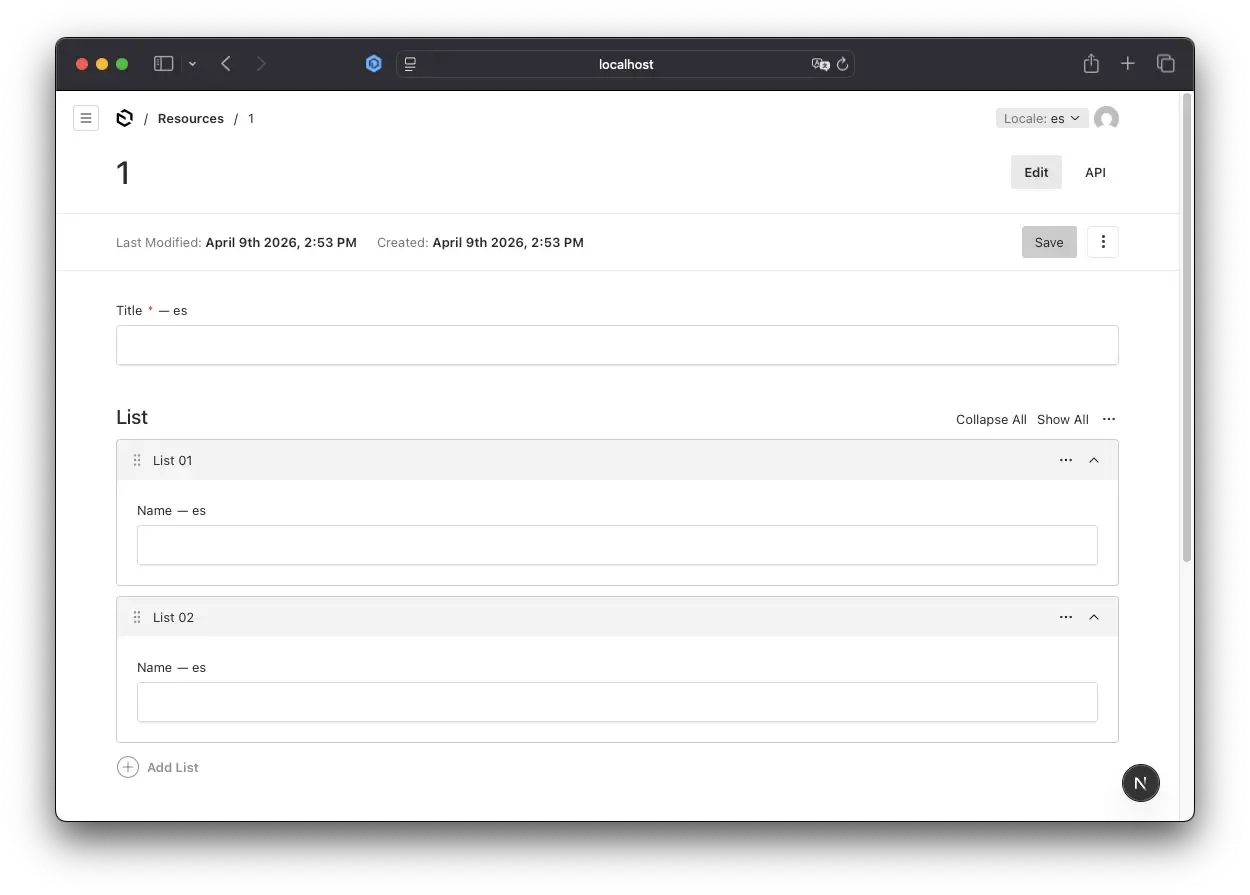
This creates several problems:
- Editors waste time - They can't see what content exists in the default locale
- Translation errors - No context leads to inconsistent translations
- Workflow bottlenecks - Constant back-and-forth between locales
- Poor UX - Frustrating editing experience
Why This Happens
This is not a bug in Payload CMS - it's by design. Understanding why helps you implement the correct solution.
How Payload Stores Localized Data
Payload CMS handles localization at the field level, not the document level. When you mark a field as localized: true:
{
  name: 'title',
  type: 'text',
  localized: true,
}
Payload stores it like this in the database:
{
  "title": {
    "en": "English Title",
    "es": "Título en Español"
  }
}
The Admin UI Only Shows Current Locale
The admin interface only renders the value for the active locale. If es is empty, you see an empty field - even though en has data.
Arrays Are Shared Across Locales
Arrays themselves are not localized - only the fields inside them:
{
  "list": [
    {
      "id": "1",
      "name": {
        "en": "Item One",
        "es": ""
      }
    }
  ]
}
The array structure is shared, but field values are locale-specific.
Fallback Only Works in the API
Payload's fallback: true config ensures empty locale values return the default locale via the API:
// payload.config.ts
localization: {
  locales: ['en', 'es'],
  defaultLocale: 'en',
  fallback: true, // <- Only affects API responses
}
This protects your frontend from showing empty content, but doesn't help editors in the admin UI.
The Solution Architecture
Our solution has three components:
- Payload Config: API-level protection
- API Route Handler + Auth + Cache: Verify auth & fetch via SDK
- Custom Field Component: Show fallback in admin UI
Key Design Decisions:
- Use GET requests (RESTful for read operations)
- Verify authentication to prevent unauthorized access
- Use Next.js API Route Handlers for parallel request handling
- Implement in-memory caching to minimize database queries
- Use Payload SDK (not REST API) for better performance and type safety
- Single reusable component that works everywhere
- Zero configuration - component reads context automatically
Step-by-Step Implementation
Step 1: Enable Required Configuration
First, ensure your Payload config has fallback enabled and Next.js has the experimental useCache flag enabled:
Payload Config:
// src/payload.config.ts
import { buildConfig } from "payload";

export default buildConfig({
  // ... other config

  localization: {
    locales: ["en", "es"],
    defaultLocale: "en",
    fallback: true, // <- Essential for API protection
  },

  // ... collections, etc.
});
Next.js Config:
// next.config.ts
import { withPayload } from "@payloadcms/next/withPayload";
import type { NextConfig } from "next";

const nextConfig: NextConfig = {
  cacheComponents: true,
  experimental: {
    useCache: true, // <- Required for "use cache" directive
  },
};

export default withPayload(nextConfig);
Why this matters:
- Payload fallback prevents your production frontend from showing empty content when translations are missing
- Next.js
useCacheflag enables the"use cache"directive for optimal performance
Step 2: Create API Route Handler with Next.js Native Caching
Create a Next.js API route that uses Payload SDK to fetch the default locale value. This endpoint uses GET (RESTful for read operations), includes authentication checks for security, and leverages Next.js native caching with the "use cache" directive for optimal performance:
// src/app/api/default-locale-value/route.ts
import { NextRequest, NextResponse } from "next/server";
import { unstable_cacheLife as cacheLife } from "next/cache";
import { CollectionSlug, getPayload } from "payload";
import config from "@/payload.config";
import { get } from "radash";

async function getDefaultLocaleValue(
  collectionSlug: CollectionSlug,
  documentId: string,
  fieldPath: string,
) {
  "use cache";
  cacheLife("minutes");

  const payload = await getPayload({ config });

  const doc = await payload.findByID({
    collection: collectionSlug,
    id: documentId,
    locale: "en",
    depth: 0,
  });

  if (!doc) {
    return null;
  }

  const pathParts = fieldPath.split(".");
  let value = doc;

  for (const part of pathParts) {
    if (value === null || value === undefined) {
      return null;
    }

    value = get(value, part);
  }

  return typeof value === "string" ? value : null;
}

export async function GET(request: NextRequest) {
  try {
    const searchParams = request.nextUrl.searchParams;
    const collectionSlug = searchParams.get("collectionSlug") as CollectionSlug;
    const documentId = searchParams.get("documentId");
    const fieldPath = searchParams.get("fieldPath");

    if (!collectionSlug || !documentId || !fieldPath) {
      return NextResponse.json(
        { error: "Missing required parameters" },
        { status: 400 },
      );
    }

    const cookies = request.cookies;
    const payloadToken = cookies.get("payload-token");

    if (!payloadToken) {
      return NextResponse.json({ error: "Unauthorized" }, { status: 401 });
    }

    const payload = await getPayload({ config });

    try {
      const { user } = await payload.auth({ headers: request.headers });
      if (!user) {
        return NextResponse.json({ error: "Unauthorized" }, { status: 401 });
      }

      const value = await getDefaultLocaleValue(
        collectionSlug,
        documentId,
        fieldPath,
      );

      return NextResponse.json({ value });
    } catch (authError) {
      return NextResponse.json({ error: "Unauthorized" }, { status: 401 });
    }
  } catch (error) {
    console.error("Failed to fetch English value:", error);
    return NextResponse.json(
      { error: "Internal server error" },
      { status: 500 },
    );
  }
}
Key Points:
- Next.js
"use cache"directive - Automatic function-level caching cacheLifeconfiguration - Cache duration set to 60 seconds- RESTful GET method - Semantically correct for read operations
- Authentication required - Verifies user is logged into Payload admin
- Cookie-based auth - Checks for
payload-tokenand validates session - Uses
getPayload()for direct database access - Handles nested paths like
list.0.nameautomatically - Returns
nullgracefully on errors - Zero configuration caching - No manual cache management needed
Step 3: Create Localized Text Field Component
Create a custom field component that shows the English value as a reference:
// src/components/LocalizedTextField.tsx
"use client";

import {
  useField,
  useLocale,
  useDocumentInfo,
  TextInput,
} from "@payloadcms/ui";
import React, { CSSProperties, useEffect, useState } from "react";

const FALLBACK_STYLE: CSSProperties = {
  marginTop: "8px",
  padding: "4px 8px",
  backgroundColor: "#f5f5f5",
  borderRadius: "4px",
  fontSize: "12px",
};

interface LocalizedTextFieldProps {
  path: string;
}

export const LocalizedTextField: React.FC<LocalizedTextFieldProps> = ({
  path,
}) => {
  const locale = useLocale();
  const { id, collectionSlug } = useDocumentInfo();
  const { value, setValue } = useField<string>({ path });
  const [englishValue, setEnglishValue] = useState<string | null>(null);
  const [loading, setLoading] = useState(false);

  const isEnglish = locale.code === "en";

  useEffect(() => {
    if (isEnglish || !id || !collectionSlug) {
      setEnglishValue(null);
      return;
    }

    const fetchEnglishValue = async () => {
      setLoading(true);
      try {
        const params = new URLSearchParams({
          collectionSlug,
          documentId: id.toString(),
          fieldPath: path,
        });

        const response = await fetch(`/api/default-locale-value?${params}`, {
          method: "GET",
          credentials: "include", // Include cookies for authentication
        });

        if (!response.ok) {
          throw new Error("Failed to fetch English value");
        }

        const data = await response.json();
        setEnglishValue(data.value);
      } catch (error) {
        console.error("Failed to fetch English value:", error);
      } finally {
        setLoading(false);
      }
    };

    fetchEnglishValue();
  }, [id, isEnglish, path, collectionSlug]);

  return (
    <div>
      <TextInput
        path={path}
        value={value || ""}
        onChange={(e: React.ChangeEvent<HTMLInputElement>) =>
          setValue(e.target.value)
        }
      />

      {!isEnglish && englishValue && (
        <div style={FALLBACK_STYLE}>EN: {englishValue}</div>
      )}

      {loading && <div style={FALLBACK_STYLE}>Loading English value...</div>}
    </div>
  );
};

export default LocalizedTextField;
What This Component Does:
- Reads current locale from Payload's context
- Fetches English value via authenticated GET request
- Includes credentials to pass authentication cookies
- Shows reference below the input for editorial context
- Handles loading states gracefully
- Works automatically - no manual configuration needed
- Benefits from caching - subsequent loads are instant
Step 4: Apply to Your Collection Fields
Update your collection to use the custom component:
// src/collections/Resources.ts
import type { CollectionConfig } from "payload";

export const Resources: CollectionConfig = {
  slug: "resources",
  admin: {
    useAsTitle: "title",
  },
  fields: [
    {
      name: "title",
      type: "text",
      localized: true,
      required: true,
      admin: {
        components: {
          Field: "@/components/LocalizedTextField",
        },
      },
    },
    {
      name: "list",
      type: "array",
      fields: [
        {
          name: "name",
          type: "text",
          localized: true,
          admin: {
            description: "Localized field with English fallback reference",
            components: {
              Field: "@/components/LocalizedTextField",
            },
          },
        },
      ],
    },
  ],
};
Notice:
- Simple configuration - just reference the component path
- No props needed - component reads everything from context
- Works in top-level fields (
title) and array fields (list.*.name) - Same component, no duplication
Step 5: Generate Import Map
Run Payload's import map generator to register your custom components:
npx payload generate:importmap
This updates Payload's admin UI to use your custom components.
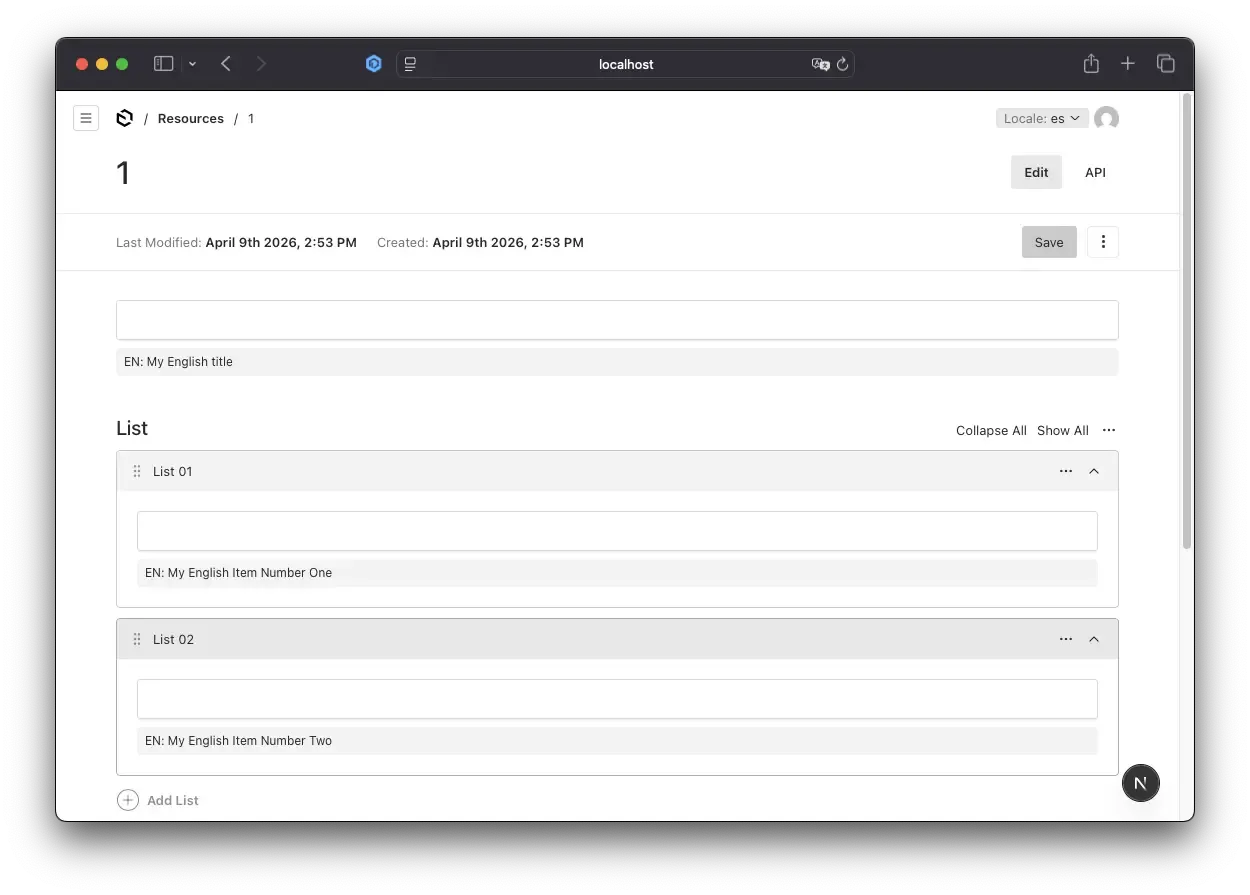
For production deployments with multiple localized collections, consider implementing automated translation workflows to scale your multilingual content. Check our Auto-Translation with Azure AI guide for the complete implementation.
How It Works: Request Flow
Flow Diagram
- Editor switches to Spanish locale
- Component detects locale is not English
- Component calls
GET /api/default-locale-valuewith query params - Route verifies user authentication via Payload session
- Route checks Next.js native cache layer
- Cache miss: Executes
getDefaultLocaleValue(cached function) - Fetches document with
locale=envia Payload SDK - Navigates to field path (e.g.,
list.0.name) - Result cached automatically by Next.js for 60 seconds
- Returns to component
- Component displays English value below input field
Performance Benefits with Next.js 15 Caching:
When editing a document with 100 localized array fields:
- First load: 100 API requests → cached by Next.js
- Subsequent loads (within 60s): Instant cache hits
- Automatic invalidation: Cache refreshes after TTL expires
- Edge-optimized: Compatible with Vercel Edge Runtime
Example: Editing an Array Item
English Locale:
Title: [Product Overview]
Spanish Locale (before typing):
Title: [                    ]
EN: Product Overview
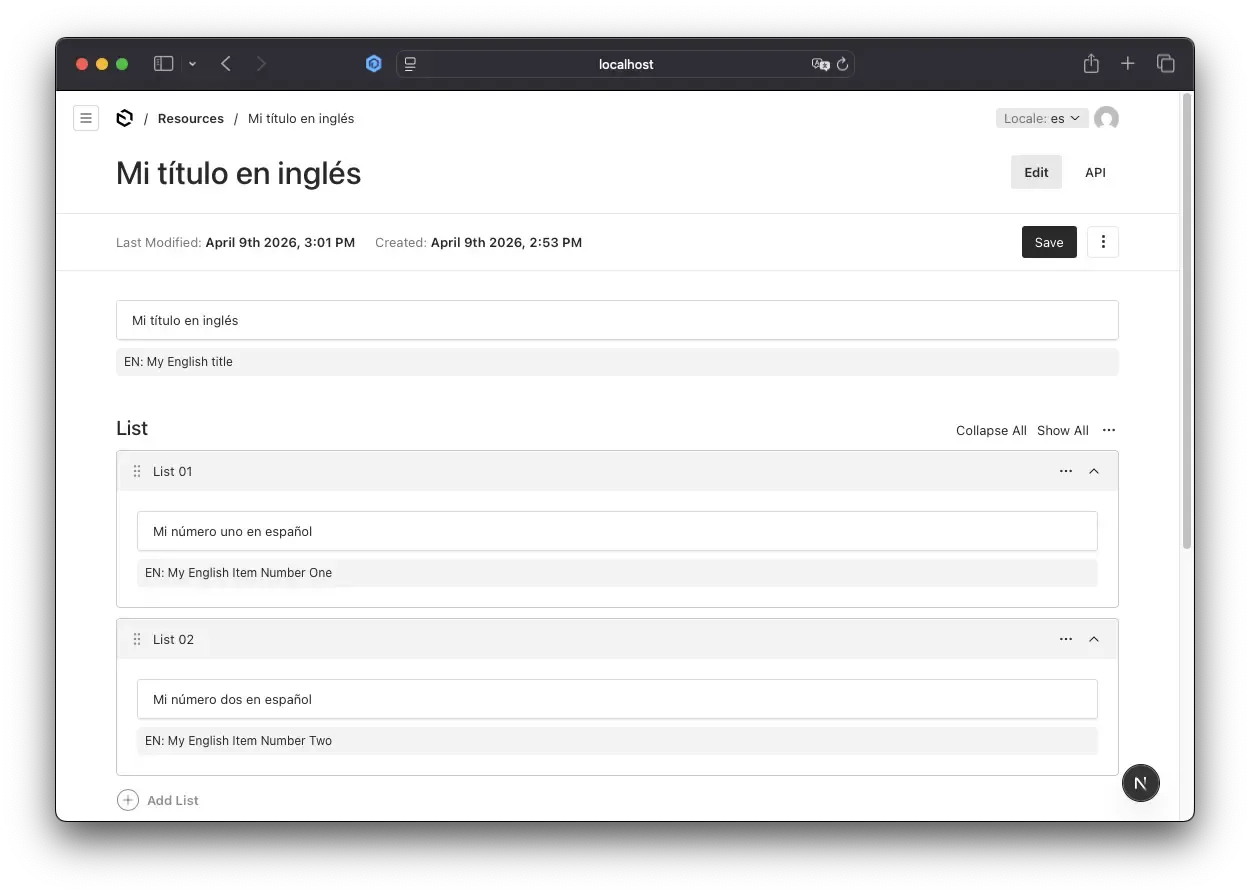
Spanish Locale (after typing):
Title: [Descripción del Producto]
EN: Product Overview
The English reference stays visible for context.
Conclusion: Production-Ready Payload CMS Localization UX for 2026
Localized fields in Payload CMS arrays work correctly by design, but the default admin UX doesn't support translation workflows well. By implementing this Next.js 15 + Payload CMS solution with native caching, you:
- Solve the empty field problem for editors - No more context switching between locales
- Use Next.js 15 native caching for optimal performance - Instant load times with
use cachedirective - Follow RESTful API design with GET requests - Semantically correct, cacheable endpoints
- Implement authentication to secure your endpoints - Prevent unauthorized access to field data
- Use Payload SDK for type-safe database access - Better performance than REST API
- Enable automatic cache management - Zero-config caching with configurable TTL
- Create a reusable component that works everywhere - Single component for all localized fields
- Lay the foundation for translation automation - Ready for AI-powered workflows
Key Takeaways for Developers & AI Agents
- Enable
fallback: truein Payload config for API-level protection - Use GET requests for read operations (RESTful best practice)
- Always verify authentication to prevent unauthorized data access
- Leverage Next.js
use cachedirective for function-level caching - Use Payload SDK (not REST API) for better type safety and performance
- Create reusable components that read context automatically via hooks
- Include credentials in fetch requests for cookie-based authentication
- Consider automation for large-scale translation - see Auto-Translation with Azure AI
- Implement security best practices from our Payload CMS Security guide
- Monitor performance with proper caching TTL and cache hit rates
Resources for Payload CMS Developers
- Payload CMS Localization Docs - Official localization guide
- Payload Custom Components Guide - Build custom admin components
- Next.js 15 Caching Documentation - Data caching strategies
- Complete Code on GitHub - Full implementation with auto-translation
- Payload Discord Community - Get help from Payload experts
Need Payload CMS Experts?
u11d specializes in Payload CMS development, migration, and deployment. We help you build secure, scalable Payload projects, migrate from legacy CMS platforms, and optimize your admin, API, and infrastructure for production. Get expert support for custom features, localization, and high-performance deployments.


Frequently Asked Questions
Can I use this with MongoDB or PostgreSQL?
Yes! The code works with any Payload-supported database. Just change the adapter in payload.config.ts.
Will this work in production with Vercel Edge Runtime?
Yes! Next.js "use cache" is edge-compatible.
How do I customize the cache duration?
Modify the cacheLife function. Check documentation for more details.
Can I use this pattern for other field types (textarea, richText)?
Yes! The same pattern works for any localized field type (textarea, richText, select). Just adjust the component logic to handle the specific field type's value format.
Will this work with Payload CMS 3.0+ and Next.js 15?
Yes! This implementation is built specifically for Payload 3.0+ with Next.js 15's native use cache directive.
How does this compare to other headless CMS localization solutions?
Most headless CMS platforms (Contentful, Sanity, Strapi) don't provide fallback hints in admin UI by default. This solution is unique to Payload's extensibility.